Short answer: Claude has no image or video model of its own (Anthropic's help center says it does not generate photos or illustrations, Can Claude produce images?), so it cannot animate a photo by itself. With a video connector it can: you give it the photo and describe the movement, and the connector makes the clip. With Dora's connector the default model, Seedance 2 Mini, costs 31 coins for 8 seconds, roughly $0.31 to $0.62, paid with Dora coins, not your Claude plan.
Before you start
You need Claude with a custom connector (Anthropic lists every plan, Free limited to one, Claude Help Center) and a Dora account with coins. Adding the connector takes about a minute; the steps are in how to make images in Claude, so they are not repeated here.
Step by step
- Have the photo ready. In our three examples the photo was a public https link to an image. See below for what we know about other ways.
- Say how it should move. One or two actions, who does them, and what the camera does: “she smiles and picks up the phone, fixed camera”.
- Choose the length. Four seconds for one action, eight for a walk and a wave. Say vertical, horizontal or square.
- Ask for the price first. Add “tell me the cost first and wait for my confirmation”; otherwise Claude may start straight away.
- Open the video. The video comes back as a link to the file, not inside the chat. Download it from there.
How to give Claude the photo
In all three examples below, the photo was passed as a public https link to an image (the address of a picture already stored in Dora). That is what we can show worked. We have not tested attaching a photo straight to the Claude chat for this, so we do not say whether it works; if it fails, put the photo somewhere it has a public link and give Claude that link.
How to write the movement
- Start from what is in the photo. “The woman from the photo…” keeps the person; naming objects that are in the picture (the wall phone, the lamp) gives the motion something to act on.
- One action per short clip. Picking up a phone fits in 4 seconds; walking across a room and waving needed 8.
- Say what the camera does. “Fixed camera” keeps the frame still; “handheld” lets it move and follow.
- Keep the look. Repeat the style of the photo (“warm 1980s film look”) so the clip matches it.
Three photos animated this way
All three were made with Dora's connector called from Claude, on 1 and 2 November 2026, with Seedance 2 Mini, and are kept in Dora's records with their prompt, settings and cost. None was made for this page. The woman is not a real person: the first photo was generated with Dora, and the other two are versions of it. None of the three files has a sound track. Click a frame to watch the clip.
1. A walk and a wave
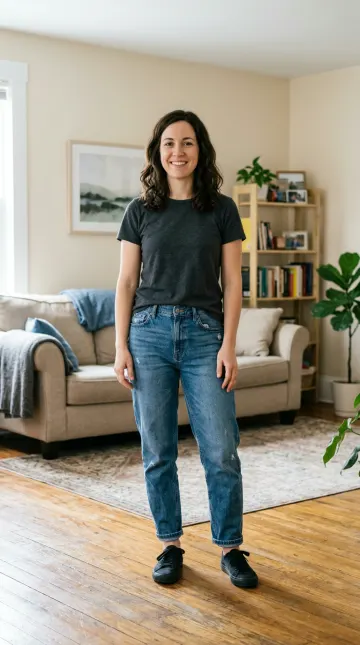
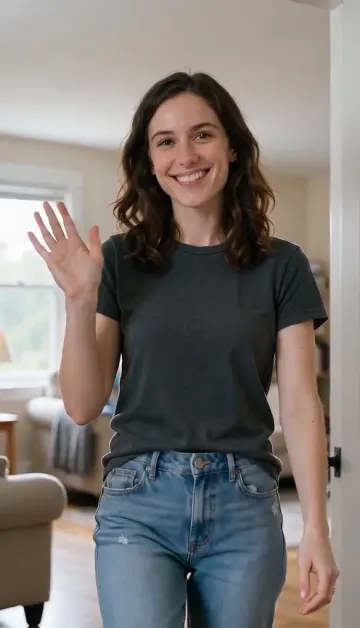
Watch the video (MP4) · Seedance 2 Mini, vertical 9:16, 8 seconds, 480p, 31 coins.
Exact video prompt:
The woman from the photo walks toward the camera across the bright room, smiles and waves, her hair moving slightly, handheld camera, natural daylight
She walks up to the camera, smiles and waves, and the room stays the same. The camera follows her so closely that the clip ends on her face and shoulders, not her whole body.
2. A 1980s photo picks up the phone
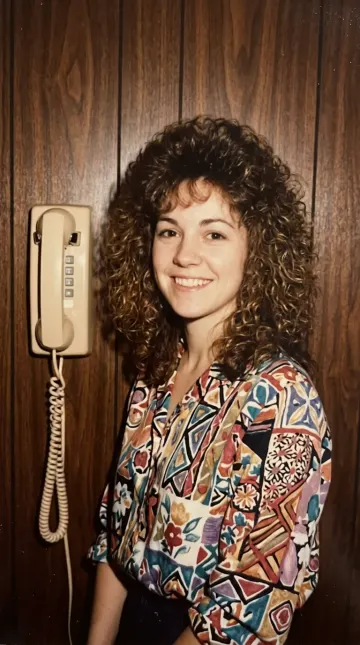
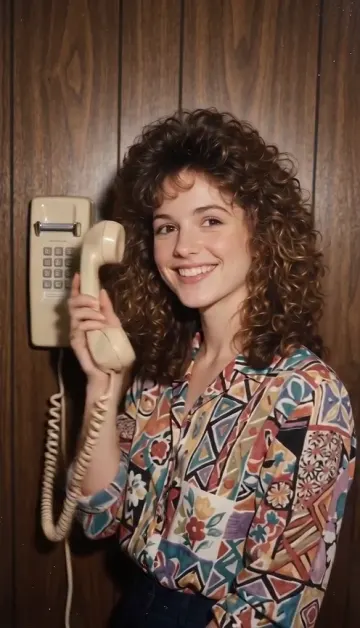
Watch the video (MP4) · Seedance 2 Mini, vertical 9:16, 4 seconds, 480p, 16 coins.
Exact video prompt:
She smiles, tilts her head and picks up the wall phone, curls moving slightly, fixed camera, warm 1980s film look with slight grain
She takes the receiver off the wall and holds it to her ear, smiling, with the cord moving. Four seconds is enough for one action like this.
The starting photo was itself made from the first one, with this prompt (Nano Banana 2, 8 coins):
Turn the person in the reference photo into a real 1980s snapshot: same face, big curly 80s hair, patterned blouse, standing against wood-panelled wall next to a beige wall phone, warm faded film colours, soft flash, slight grain, natural smile, looks like a genuine photo from 1985, vertical, no text
3. A 1970s photo switches the lamp off and on
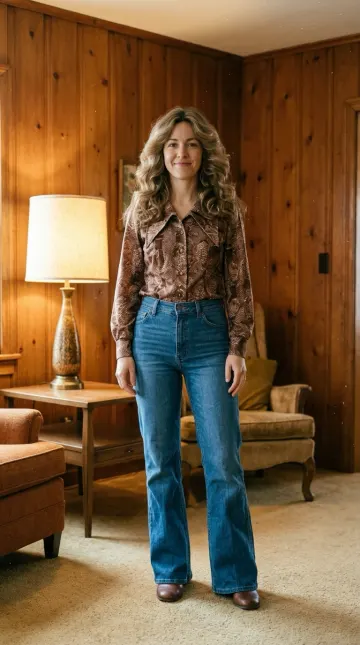
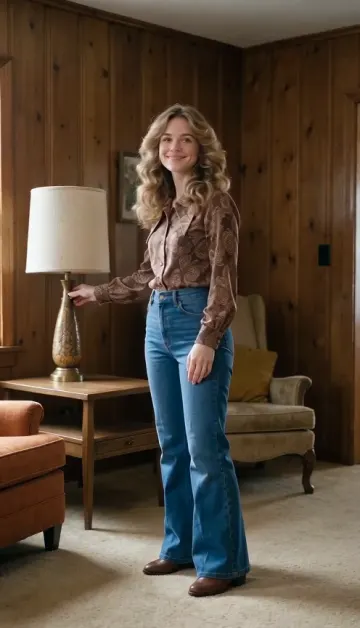
Watch the video (MP4) · Seedance 2 Mini, vertical 9:16, 4 seconds, 480p, 16 coins.
Exact video prompt:
She smiles, turns to the table and switches the lamp off and on, wavy hair moving slightly, warm light changes on the wood walls, fixed camera, golden 1970s film look with slight grain
She reaches for the lamp and it goes off and on again near the end. The change of light on the walls is weaker than the prompt asked.
The starting photo was itself made from the first one, with this prompt (Nano Banana 2, 8 coins):
Turn the person in the reference photo into a real 1970s snapshot: same face, long feathered wavy hair, brown patterned blouse with a wide collar, warm wood-panelled living room with a lamp, golden faded film colours, slight grain, soft smile, looks like a genuine photo from 1975, vertical, no text
What it costs
| Video model in Dora's connector | Coins | Notes |
|---|---|---|
| Seedance 2 Mini | 31 for 8 s | The default; 16 for 4 s at 480p, 66 for 8 s at 720p |
| Grok Imagine 1.5 | 20 | Cheaper; one photo at most |
| Kling 2.6 Motion Control | 11 per second | Copies the movement of a video you give it onto the person in the photo; 3 seconds minimum |
Prices from Dora's connector model list on 2 November 2026; longer clips, higher resolution and sound cost more (Dora's models page). A coin is about $0.01 on the weekly plan and $0.02 on the yearly one (pricing). If you first change the photo, as in examples 2 and 3, add the image: 10 coins with Nano Banana 2 (8 when those were made). With no coins nothing is made or charged, and a failed generation gives the coins back.
More
For videos from a description instead of a photo, and Dora's own timed tests, see how to make videos in Claude. For still images, see how to make images in Claude. Setup with a button that opens the form: Dora for Claude. On iPhone, the same account and coins work in the Dora app.
Sources
- Claude Help Center, Can Claude produce images? and Get started with custom connectors using remote MCP, checked 2 November 2026.
- Dora's connector model list and pricing, read on 2 November 2026; Dora models and costs.
- Dora's generation records for the three videos and their starting photos: model, settings, coins, prompt and photo link.
Disclosure: Saga Labs, which publishes this site, makes Dora. The photos and videos were made with Dora; costs are Dora's own.
Questions people ask
Can Claude animate a photo?
Not by itself: Claude has no video model. With a video connector such as Dora, you give it the photo and describe the movement, and the connector makes a short clip and returns a link to it.
How much does it cost to animate a photo in Claude?
Your Claude plan does not pay for it. With Dora the default, Seedance 2 Mini, is 31 coins for 8 seconds and 16 for 4 seconds at 480p, roughly $0.16 to $0.62.
How do I give Claude the photo?
In our examples the photo was a public https link to the image. We have not tested attaching it straight to the chat, so if that fails, use a public link.
How long should the clip be?
Four seconds is enough for one action, like picking up a phone; a walk and a wave took eight.
Does the video come with sound?
None of our three examples has a sound track. Some models can add sound, and it costs more.
Is the result shown in the chat?
Videos come back as a link to the file, not inside the chat.